Plans and billing
How Crovio is priced by monthly orders, what each module includes, yearly savings and how to change or cancel.
Crovio is priced by how many orders your store gets a month. Pick Everything for every tool, or build your own plan from Testing & insights plus the modules you need. Every store gets a 14-day free trial from the day it installs Crovio, and Crovio works out your order tier for you.
Prices
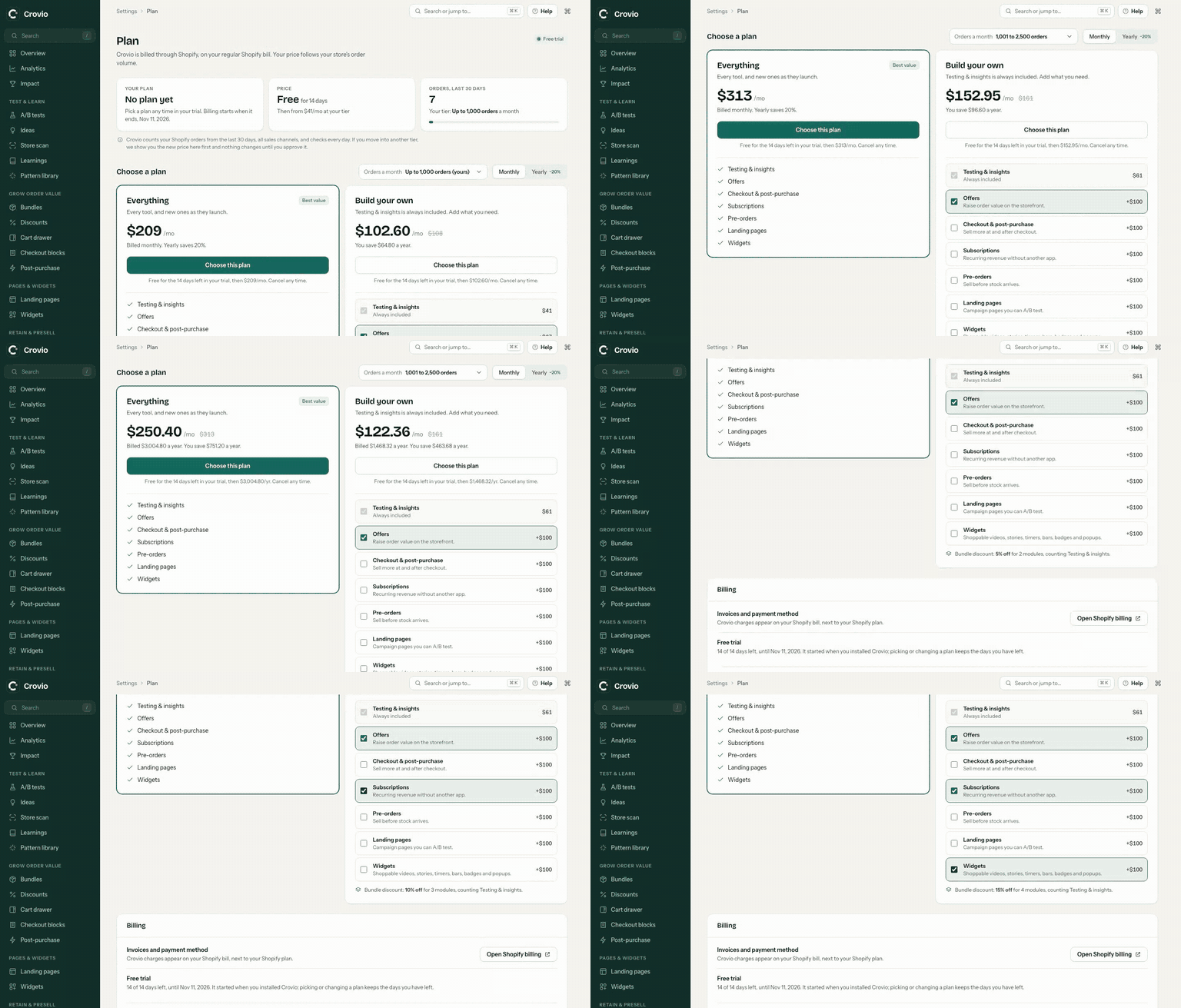
| Orders a month | Everything | Everything, paid yearly (per month) | Testing & insights only | Each extra module |
|---|---|---|---|---|
| Up to 1,000 | $209 | $167.20 | $41 | $67 |
| 1,001 to 2,500 | $313 | $250.40 | $61 | $100 |
| 2,501 to 5,000 | $438 | $350.40 | $86 | $140 |
| 5,001 to 10,000 | $606 | $484.80 | $118 | $194 |
| 10,001 to 25,000 | $877 | $701.60 | $172 | $281 |
| 25,001 to 50,000 | $1,170 | $936 | $229 | $375 |
| 50,001 to 100,000 | $1,463 | $1,170.40 | $287 | $469 |
| 100,001 to 200,000 | $1,734 | $1,387.20 | $340 | $556 |
Above 200,000 orders a month, talk to us for a custom quote. See the pricing page to work out your exact price.
What's in each module
- Testing & insights (always included)
- A/B tests with a visual editor
- Content, split URL, template, price, offer, shipping and checkout tests
- Segment filters (device, source, UTM, events…)
- Impact reports and client sharing
- Dashboard and report builder
- Store scan and test ideas with Claude
- Offers
- Bundles and quantity breaks
- Free gifts, tiered spend and free shipping goals
- Cart drawer with rewards and upsells
- Checkout & post-purchase
- Checkout blocks (Shopify Plus for checkout page)
- One-click post-purchase offers and funnels
- Post-purchase surveys
- Checkout look & feel
- Subscriptions
- Subscribe & save widget
- Free trials and intro pricing
- Customer portal and renewals
- Churn insights and cancel-flow offers
- Pre-orders
- Deposits or full payment
- Out-of-stock auto pre-order sitewide
- Button designer
- Landing pages
- Landing page builder with 14 templates and 34 sections
- Pages drafted by Claude from a brief or a page you like
- Published as real Shopify pages, with SEO and live prices
- Split URL A/B tests between page versions
- Widgets
- 16 widgets: announcement and free shipping bars, countdowns, trust badges, sticky add to cart, low stock, delivery dates, popups, shoppable videos and Instagram stories
- Popup discount codes created in Shopify in one click
- Targeting by page, product, device, schedule and visitor
- One-click A/B test of any widget against no widget
Everything includes every module above, Landing pages and Widgets included.
Ways to save
- Pay yearly and get 20% off.
- Build your own plan with several modules and get a bundle discount: 5% off with 2 modules, 10% off with 3 modules, 15% off with 4 or more modules, counting Testing & insights. If the modules you pick add up to more than Everything, the Plan page and the pricing page tell you, since Everything is then the cheaper choice.
- Come through a partner: merchants referred by a Crovio affiliate get an extra 10% off. Referral discount.
Discounts stack in that order: bundle, then yearly, then referral.
Billing
You pick and pay for your plan inside Crovio, on the Plan page (under Settings). Shopify shows the price for you to approve, and the charge appears on your regular Shopify bill. Nothing is charged until your free trial ends: a plan you pick during the trial is free for the days left, then Shopify starts billing it.
Your order tier
Crovio counts your store's orders in the last 30 days and picks your tier for you. The Plan page shows the count and the tier it falls in. You can choose a higher tier if you expect to grow, but not a lower one.
Crovio checks your order count every day. If your orders move into a different tier, the Plan page and Overview show the new price, and you approve it in one click. The new price starts at your next billing cycle, never mid-cycle, and nothing changes until you approve it. During your free trial the new tier applies as soon as you approve it (it's still free until the trial ends). A small dip doesn't move you down: your orders need to fall about 10% below the tier's limit first. If a move up is still waiting for your approval after a week, the reminder shows on every page of Crovio, not just Overview.
Change or cancel
- Switch between Everything and Build your own, add or remove modules, or move between monthly and yearly on the Plan page. Shopify asks you to approve each change. Upgrades start right away; moving from yearly to monthly, or to a cheaper yearly plan, starts at your next billing cycle.
- To cancel, use Cancel plan on the Plan page, or uninstall Crovio. Anything you've already set live keeps running until you switch it off or uninstall, and you can pick a plan again at any time.
Was this page helpful?